What quality can you download TikTok short dramas in? 540p, 720p and 1080p
Your quality choice is a ceiling: each episode saves at the best tier TikTok serves, up to 1080p. What “available” means, HEVC vs H.264, and how to check.
Written with AI assistance and reviewed by the ShortDrama Downloader team before publication. How we make guides
In short
- Short answer: up to 1080p: you choose 1080p, 720p or 540p as a ceiling, and each episode is saved at the best of those tiers that TikTok serves for it.
- What you get: MP4 files in HEVC (H.265) at every tier, or in H.264 when you choose 540p. An episode with no 1080p version comes out at the next best tier TikTok has (usually 720p or 540p). The Library’s Convert to H.264 makes a full-resolution H.264 copy if a device needs one.
- Limits: nothing is saved above 1080p, a lower tier is saved as it is and never enlarged, and the tier can change from episode to episode because it depends on what TikTok has.
Can you save a TikTok short drama in 1080p? Yes, when TikTok has a 1080p version of the episode. Not every drama has one, and within one series some episodes can have it while others don’t. This guide explains how the quality choice in TikTok ShortDrama Downloader works, what “available” means, and how to see what you actually got. It applies the same way to PineDrama links, which open the same episode picker.
Applies to: TikTok ShortDrama Downloader and PineDrama Downloader (the same app) 1.5.0 on Windows 10 and 11 (64-bit). Tested on Windows 11 Pro 25H2, 30 September 2026.
What 540p, 720p and 1080p mean for a short drama
Short dramas are vertical videos, so the number is the width of the picture, its short side:
| Tier | Size of an upright episode in our tests |
|---|---|
| 1080p | 1080 × 1920 pixels |
| 720p | 720 × 1280 pixels (one drama’s 720p files were 720 × 1254) |
| 540p | 576 × 1024 pixels |
We measured these on episodes saved with version 1.5.0 on 30 September 2026. Every 540p file we saved, in HEVC and in H.264, was 576 pixels wide.
The app names the tier from the finished file’s short side. So a file 576 pixels wide, which some other tools call 576p, shows up here as 540p.
The quality you pick is a ceiling
In the episode picker, Quality offers 1080p, 720p and 540p. The default is 1080p, and you can change it in Settings > Downloads > Default quality & codec.
- Each episode is saved at the best tier TikTok serves for it, up to your choice. Choosing 1080p never gets you less than a lower setting would: if an episode only has 720p, you get 720p.
- Before you choose, the picker checks up to three episodes (the first, one from the middle and the last) and grays out any tier none of them has. Point at a grayed-out tier to see why, for example
This drama has no 1080p version. - Because only three episodes are checked, a tier can still be missing for some other episodes. Those episodes get the next best tier, which can even be 360p for an episode that has nothing higher.

 Open the full-size pictureOpen the full-size picture

What “available” means
TikTok keeps each episode in several versions, and which versions exist can differ between dramas and between episodes of the same drama. “Available” means the versions TikTok serves for that episode when your signed-in account asks for it.
The app can’t create a version TikTok doesn’t have. It never enlarges a lower tier to pass it off as a higher one: a 720p episode stays 720p.
How to see what you actually got
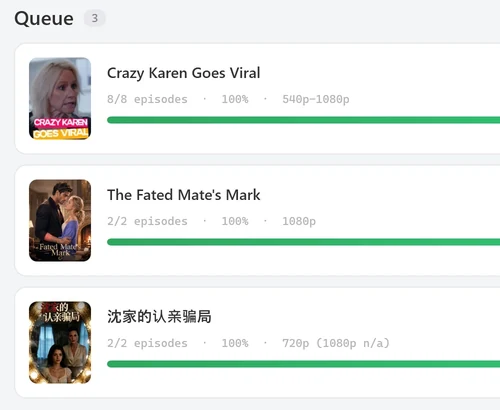
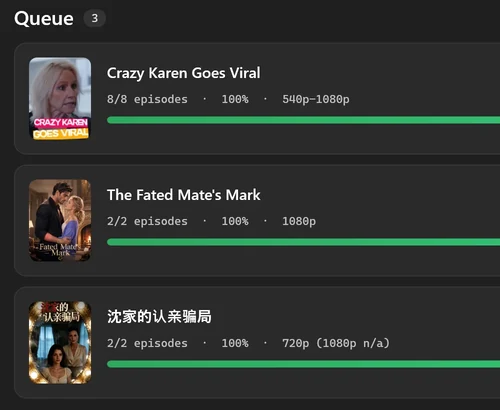
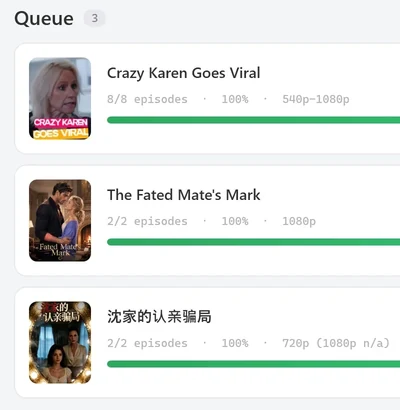
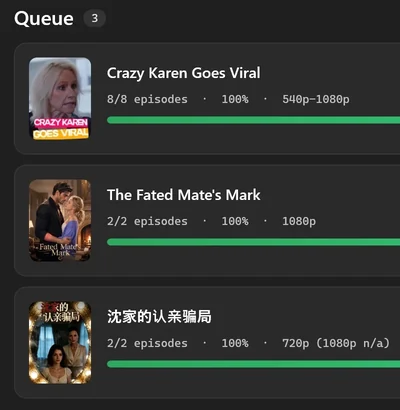
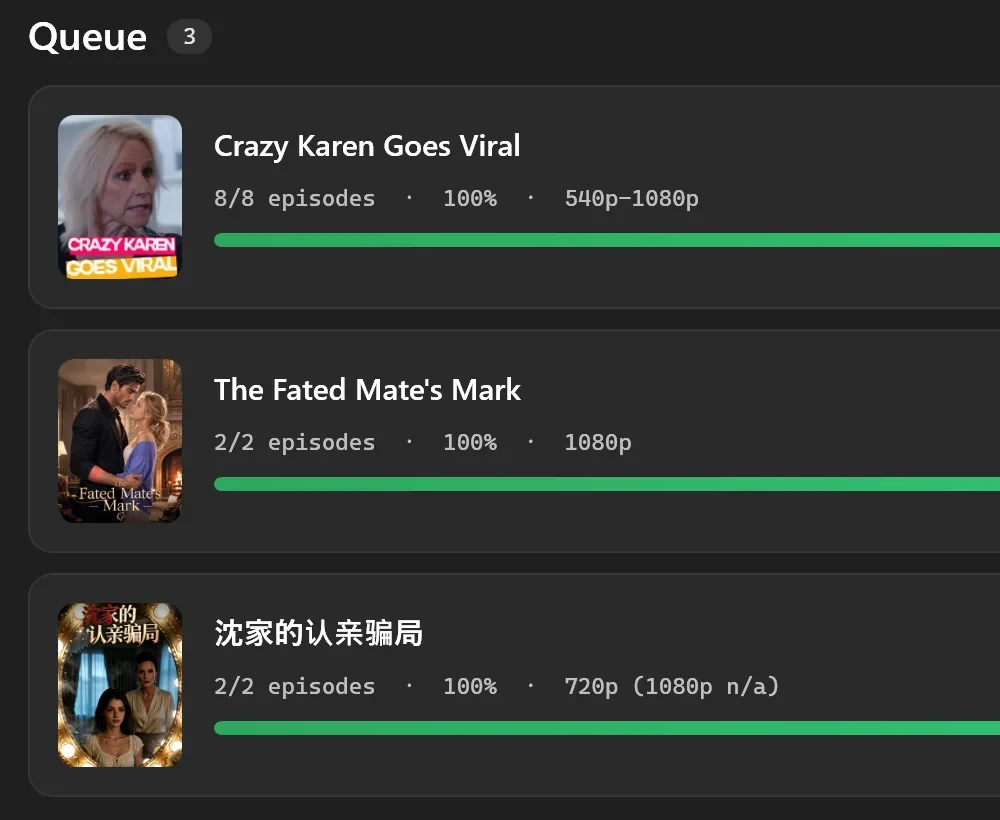
The Queue shows it on each series card. The line under the title ends with the tiers read from the finished files:
1080p: every finished episode is 1080p.540p-1080p: the finished episodes range from 540p to 1080p, because TikTok’s versions varied across the series.720p (1080p n/a): none of the finished episodes reached the tier you asked for, so the card says so in brackets.
Tested on 30 September 2026
We saw all three, downloading three public dramas at the 1080p ceiling. An 8-episode drama whose picker offered 1080p ended at 8/8 episodes · 100% · 540p-1080p: the saved files were 1080p for 5 of its episodes, 720p for 1 and 540p for 2, because the picker’s check of three episodes can’t promise a tier for all of them. A second drama ended at 2/2 episodes · 100% · 1080p. A third, which has no 1080p version, ended at 2/2 episodes · 100% · 720p (1080p n/a); we queued it at a 1080p ceiling, the way a one-click button does, and its picker, which grays out 1080p and pre-selects 720p, would simply have shown 720p.
 Open the full-size pictureOpen the full-size picture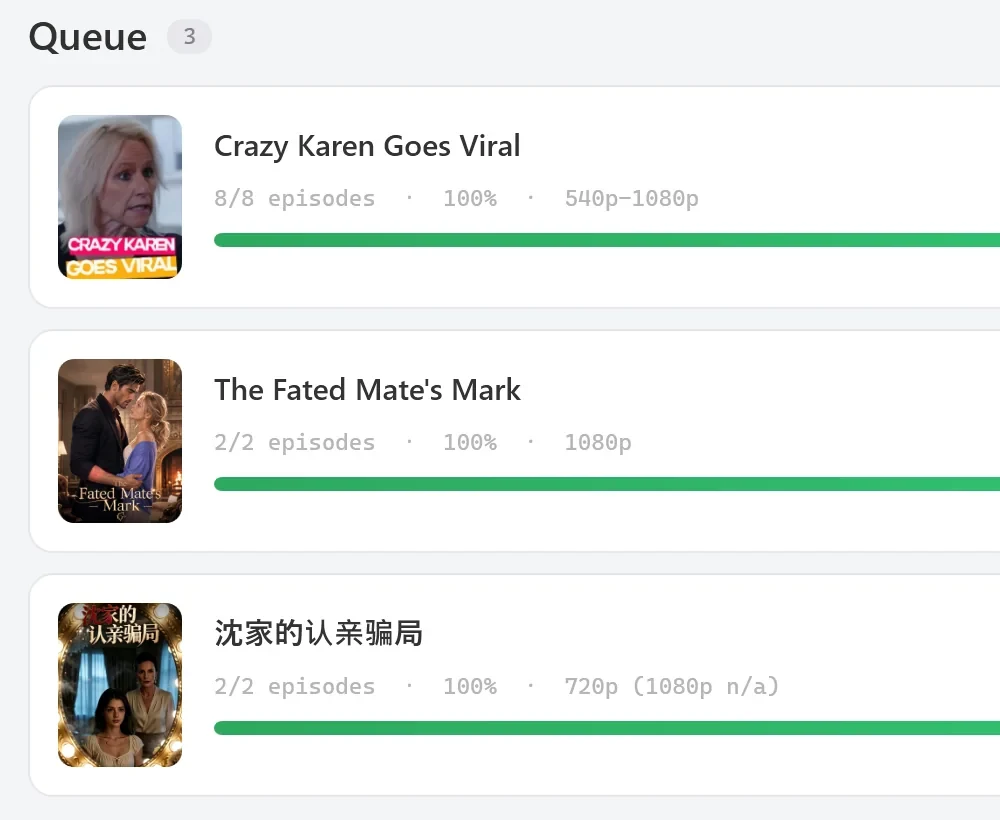
HEVC and H.264 at each tier
| Tier | HEVC (H.265) | H.264 |
|---|---|---|
| 1080p | Yes, the default | Only as a copy made with Convert to H.264 |
| 720p | Yes, the default | Only as a copy made with Convert to H.264 |
| 540p | Yes, the default | Yes, choose it in the picker |
TikTok serves H.264 only at 540p, so the picker enables H.264 only when 540p is selected. Settings says the same next to Default quality & codec: 720p/1080p are HEVC-only; H.264 tops out at 540p.
The two codecs trade size for compatibility. The app’s own tooltips put it simply: HEVC is High efficiency — smaller file, and H.264 is Compatible with almost anything.
If your player can’t open HEVC files
Some Windows setups can’t play HEVC until you add Microsoft’s HEVC Video Extensions from the Microsoft Store. Without it, Windows may say it needs a codec. You have two ways round it: add HEVC support to Windows, or make an H.264 copy of the series (next section). The app’s Preview EP 1 tells you when this is the problem and opens the clip in your default video player instead.
Getting a full-resolution H.264 copy
For H.264 at 720p or 1080p, download in HEVC, then right-click the series in Library and choose Convert to H.264. It makes full-resolution H.264 copies in an H264 subfolder and keeps your originals. The copies take more room than the HEVC files: in our test they were 2.2 to 2.6 times the size of the originals.
Which tier should you choose?
- Keep 1080p for the best version TikTok has of each episode. Because it’s a ceiling, you never lose anything by leaving it there.
- Choose 720p or 540p in HEVC to use less disk space. Lower HEVC tiers make smaller files; the exact size depends on the drama and the episode length, and each Library card shows its series’ size. 540p in H.264 may not save space at all: in our test, one episode’s 540p H.264 file (12.7 MB) was slightly bigger than its 1080p HEVC file (12.0 MB). Lower tiers can also come with lower-quality sound (see What else is in the file).
- Need H.264 for an older TV or phone? Choose 540p with H.264 in the picker, or keep 1080p in HEVC and convert later in the Library.
What the one-click buttons use
Buttons that queue a whole series without opening the picker decide the quality for you:
| Where | Button | Quality |
|---|---|---|
| Browse, one poster | Download button, or right-click Download all episodes | Your default quality from Settings, as a ceiling |
| Browse, several posters selected | Add to queue | The quality box next to the button, as a ceiling |
| Download tab, a result poster | Download button (Queue every episode) | The best tier available, with no ceiling |
| Download tab, pasted links | Download all | The best tier available, with no ceiling |
Browse’s buttons use HEVC above 540p whatever your default codec is. The Download tab’s buttons use the default codec from Settings, so if you set it to H.264, expect those downloads at 540p, the only tier TikTok offers in H.264. Leave the default codec on HEVC unless that’s what you want.
Tested on 30 September 2026
With the default codec set to H.264, the Download tab’s Queue every episode button queued a whole 60-episode drama, and its card read, for example, 4/60 episodes · 7% · 540p. The files were 576 × 1024 pixels, in H.264.
What else is in the file
Each saved episode is one MP4 with the video tier you got, the sound TikTok serves with that version of the episode, and any subtitle tracks you ticked in the picker. The sound can differ between versions: in our test, one episode’s 1080p file came with 128 kb/s sound and its 540p H.264 file with 32 kb/s. Saved episodes don’t carry a TikTok watermark overlay (we checked still frames from two dramas saved on 30 September 2026).
Troubleshooting
1080p is grayed out in the picker
None of the checked episodes has a 1080p version (This drama has no 1080p version). Choose 720p, or keep whatever the picker selected for you. If no tier is grayed out, the check found every tier or couldn’t run; the ceiling still applies either way.

 Open the full-size pictureOpen the full-size picture

I chose 1080p, but the card says 720p (1080p n/a)
TikTok had no 1080p version of those episodes, so the next best tier was saved. The download is complete and there’s nothing to fix in the app.
The H.264 option is grayed out
It’s only offered at 540p. Select 540p first, or keep HEVC and use Convert to H.264 in the Library later.
Windows says it needs a codec, or the player shows no picture
The file is HEVC and your player can’t decode it. Add HEVC support to Windows, try another player, or make an H.264 copy with Convert to H.264.
FAQ
Is 1080p only on paid plans?
No. On the Free plan you can start 2 new dramas per PC per day, each with every available episode in any quality TikTok offers for it.
Does the app make episodes look better than on TikTok?
No. It saves the version TikTok serves. Nothing is sharpened or enlarged.
Why does one series show 540p-1080p?
TikTok had different versions for different episodes of that series. Each episode was saved at the best tier it had, up to your ceiling.
Do PineDrama links work the same way?
Yes. A pasted PineDrama link opens the same episode picker with the same tiers and codecs. See saving PineDrama episodes to your PC, and the full walkthrough for a TikTok series.