Fix “Couldn’t find a drama from that link” and other link errors
What each link message in TikTok ShortDrama Downloader and PineDrama Downloader means, from “Couldn’t find a drama” to sign-in errors, and how to fix it.
Written with AI assistance and reviewed by the ShortDrama Downloader team before publication. How we make guides
In short
- Short answer: the message means the app found no short-drama series behind what you pasted; copy the share link of an episode of the drama itself and paste only that.
- Other messages: links to other websites are refused without being opened, nothing can be looked up until you sign in to TikTok, and connection trouble shows up as
Couldn't reach…orCouldn't load…. - Limits: the app saves short-drama episodes only, from TikTok and PineDrama links.
You pasted a link, clicked Go, and got a one-line message instead of an episode picker. When a link isn’t working in TikTok ShortDrama Downloader or PineDrama Downloader (the same app), that line tells you why. This guide collects the link, paste and lookup messages of version 1.5.0, quoted exactly as the app shows them, with what each one means and what to do. The most common one, Couldn't find a drama from that link — is it a short-drama link?, usually means an ordinary TikTok video, a profile without short dramas, or a drama that was removed or isn’t available where you are.
Applies to: TikTok ShortDrama Downloader and PineDrama Downloader (the same app) 1.5.0 on Windows 10 and 11 (64-bit). Tested on Windows 11 Pro 25H2, 30 September 2026.
Before you start: four quick checks
- The top left of the app shows your TikTok name, not Not signed in.
- Your internet connection works.
- You copied the link with the share button in TikTok or PineDrama, from an episode of the drama itself.
- You pasted it into the box on the Download tab. The Search dramas field in Browse searches titles only, so a link typed there is searched as a title, not opened as a link.
Where the messages appear
- On the Download tab, in the line just under the paste box.
- In the episode picker, in the line at the bottom left, next to More like this, Close and Add to queue.
 Open the full-size pictureOpen the full-size picture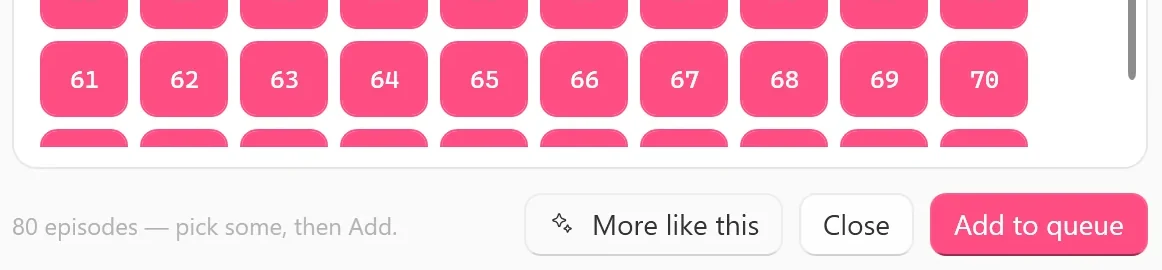
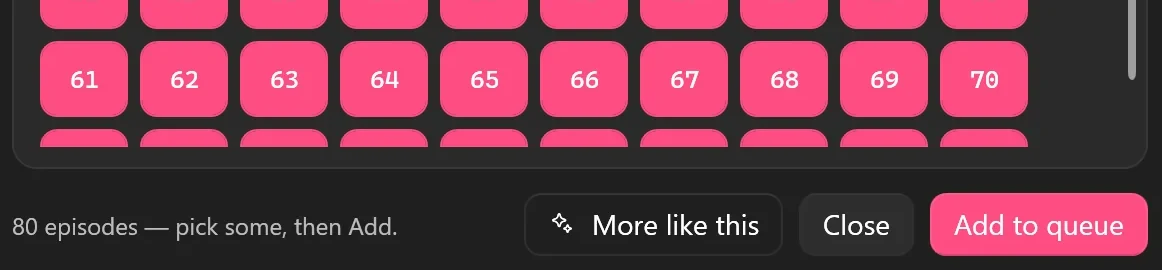
Tested on 30 September 2026
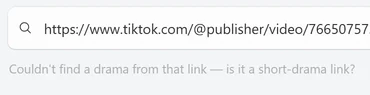
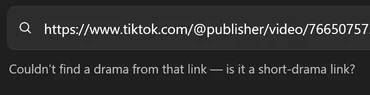
We pasted the link of an ordinary public TikTok video. The line under the box showed Finding the drama for this video… for about 20 seconds and then read Couldn't find a drama from that link — is it a short-drama link?


 Open the full-size pictureOpen the full-size picture

All link messages at a glance
Each message below links to its own section where it has one.
Log in to TikTok first — see Settings ▸ Account.You aren’t signed in, and the app needs your TikTok sign-in to look up links. What to do: sign in once, then click Go again (details).Only TikTok and PineDrama links work here — “…” isn't one, so it wasn't opened.The link points to another website, and the app refuses it without opening it. What to do: copy the link from TikTok’s or PineDrama’s share button (details).Couldn't find a drama from that link — is it a short-drama link?The link didn’t lead to a short-drama series. What to do: see its section.Couldn't read that — check the link or title and try again.Something unexpected went wrong while the app read what you pasted. What to do: check the link and click Go again.Couldn't load those links.You pasted several links and none of their series could be loaded. What to do: check your connection, then paste them again (details).Couldn't load episodes: …The series was found, but its episode list didn’t load; the words after the colon are the technical reason. What to do: close the picker, check your connection and try again (details).Couldn't reach TikTok search — check your connection, then try again.A title search got no answer from TikTok. What to do: check your connection; if it works, sign in again.Searching…, thenNo dramas found.Text only counts as a link when it contains a TikTok or PineDrama address or starts with http:// or https://; anything else is searched as a drama title, and this search found nothing. What to do: if you meant to paste a link, the clipboard held only the words of a share message, so copy the link again.Resolving link…,Resolving short link…,Resolving PineDrama link…,Finding the drama for this video…,Looking up …orScanning @… for dramas…Progress while the app looks the link up, not an error. PineDrama page links that aren’t share links can take noticeably longer; share links are quicker. What to do: wait for it to finish.TikTok is rate-limiting — waiting …s, then continuing (… dramas so far)…Progress while a profile with many dramas is scanned. What to do: let it finish.
Couldn't find a drama from that link — is it a short-drama link?
The app looked the link up on TikTok and found no short-drama series behind it. The usual reasons:
- An ordinary TikTok video or photo post. The app works out which drama a video belongs to, and an ordinary video belongs to none. It saves short-drama episodes only.
- A creator’s profile without short dramas. A profile link gives only the dramas on that profile’s Short dramas tab, never the creator’s regular posts. No tab, or an empty one, gives this message.
- A shared profile instead of an episode. A share link copied from a profile page leads to that profile, not to a drama. You can tell by the line under the box: it shows
Scanning @… for dramas…first. Two of the PineDrama share links we tried on 30 September 2026 were shared profiles and ended with this message. - A drama that was removed, made private or isn’t available where you are.
- A PineDrama page link that only opens in certain countries. PineDrama share links work outside the US, but some other PineDrama page links only open in certain countries. Copy the episode’s share link instead.
- A link that got cut short when you copied it, or TikTok not answering at that moment.
- Open the link on your phone. Check that it plays an episode of a drama series, and that the drama plays in TikTok or PineDrama where you are.
- On that episode, use the share button and copy the link. Any episode of the series works.
- Paste only that link into the box on the Download tab and click Go.
- If you pasted a profile link, open the profile in TikTok and check that it has a Short dramas tab with dramas on it.
- Still the same message? Check your connection and try again in a minute.
Availability differs by country. If a drama doesn’t play in TikTok or PineDrama where you are, we can’t help you get it and won’t suggest ways around it.
Only TikTok and PineDrama links work here — “…” isn't one, so it wasn't opened.
The app only opens https addresses on TikTok and PineDrama. Anything else is refused before the app contacts it, and the message names the website, for example Only TikTok and PineDrama links work here — “example.com” isn't one, so it wasn't opened.
Tested on 30 September 2026
We pasted https://example.com and got exactly that message, straight away and without a lookup.



 Open the full-size pictureOpen the full-size picture

Common causes:
- A link from another website or app. Other short-drama apps aren’t supported.
- A shortened or redirect link from another service that points to TikTok. Open it on your phone and share the TikTok or PineDrama episode itself.
- A promotional or install link, for example one on
pinedrama.onelink.me. It isn’t a TikTok or PineDrama address, so the app refuses it. Open it on your phone, then copy the episode’s share link inside PineDrama.
If you pasted several links, the message counts the ones it skipped, for example Only TikTok and PineDrama links work here — 2 links (e.g. “example.com”) weren't, so they weren't opened. The TikTok and PineDrama links in the same paste still load.
Log in to TikTok first — see Settings ▸ Account.
The app needs your TikTok sign-in to look up links, search, preview and download, and PineDrama links use the same sign-in. Click Not signed in at the top left, click Log in to TikTok in the ACCOUNT card, sign in on TikTok’s page, click Done, then paste your link again. Step 1 of the TikTok series guide shows each screen.
The same check shows up in other places with slightly different words: Log in to TikTok first — downloads need your session. in the episode picker, Log in to TikTok first. under Preview EP 1, (log in + tools to detect) next to Subtitles, and Log in to TikTok first (Settings ▸ Account). in Browse.
If you are signed in but links and search keep failing while your connection works, sign in again: in Settings, in the ACCOUNT card, click Switch account. It signs you out and opens the login window. If it says Couldn't fully clear the previous session. Restart the app, then switch account., do exactly that.
Connection and loading messages
These mean the link itself was fine, but something didn’t load:
Couldn't load episodes: …in the episode picker, withCouldn't load episodes.where the episode numbers should be. The series was found but its episode list didn’t arrive. Close the picker and paste the link again once your connection is back.Couldn't load those links., or a note such as3 series ready · 1 couldn't loadnext to Download all. Some or all of the pasted series didn’t load. Paste the missing ones again later.Couldn't load “…”. Nothing was queued — try again in a moment.after Download all. Wait a moment and click it again.The licence server couldn't be reached, so free downloads can't be counted right now. Check your internet connection and try again.On the Free plan, the app has to reach our licence server before a new drama starts.
A series that can’t be loaded never uses one of your Free plan’s 2 new dramas for the day: the app loads the episode list before it checks your plan.
The picker opens but shows no episodes
Sometimes a pasted episode link opens the picker with a title like “Drama” followed by a long number, and 0 eps under it. The line at the bottom says 0 episodes — pick some, then Add. and the episode area keeps showing Loading episodes… without clearing. That means TikTok returned no episodes for the drama in that link. Close the picker: there is nothing to save.
Tested on 30 September 2026
We saw this screen with an episode link whose number doesn’t belong to any drama. A drama that has been removed may look the same, but we couldn’t find one to try.
The link worked, but episodes fail in the Queue
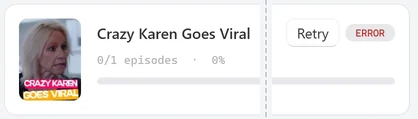
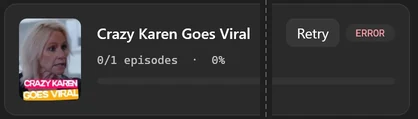
Sometimes a link opens and the episode picker works, but the episodes then fail in the Queue: the series card shows ERROR and a Retry button. Click Retry to try again. If it keeps failing, check that the drama still plays in TikTok or PineDrama. For each failed episode the app writes a log file in the logs folder inside %LOCALAPPDATA%\TikTok ShortDrama Downloader, which helps if you contact support.
The card itself doesn’t say why an episode failed; the log file does.
Tested on 30 September 2026
When we made an episode fail on purpose, the card read 0/1 episodes · 0% with ERROR and Retry, and a log file named after the episode number and the drama’s id, such as EP01-<drama id>.log, appeared in the logs folder straight away. A later failure of the same episode replaces that file.


 Open the full-size pictureOpen the full-size picture

A card marked FREE LIMIT is different: the app’s licence check stopped it, for example because today’s Free plan count was used up or the licence server couldn’t be reached, not the link.
Other messages in the episode picker
Range not understood — try e.g. 1-20, 25, 30-32.The range box takes numbers, commas and dashes only.No episodes selected — tap the numbers, or use All.Click some episode numbers, or All.Get the downloader tools first (Queue tab).Open Queue and click Get tools in the banner that names the missing tools (for exampleMissing yt-dlp — needed to download.). The installer includes these tools, so this is rare.Not added — see the message.The plan check stopped it, and the window that opens explains why. On the Free plan it may sayYou've used today's 2 free dramas…; that count resets at 00:00 UTC.
Several links, one missing
When you paste several links, you get one card per series under Pasted links and the line … series — review below, then Download all. A link that didn’t lead to a drama is simply left out, without a message of its own, and two links to the same series become one card. If only one of your links worked, the app skips the list and opens that drama’s episode picker straight away. Count the cards against your links, then paste a missing link on its own to see its message. More on pasting many links: Batch-download several TikTok short dramas at once.
FAQ
Can the app save ordinary TikTok videos?
No. It saves episodes of short-drama series only. Links to ordinary videos and photo posts give the Couldn't find a drama message. Playlists, collections, likes and sounds aren’t supported either: at most, a link that sits under a creator’s name opens that creator’s short dramas. If you’re comparing tools, this guide explains which kind of downloader you need.
Why does one PineDrama link work and another not?
PineDrama share links work outside the US, but some other PineDrama page links only open in certain countries, and a particular drama may not be offered in yours. Copy the share link from the episode in PineDrama. The full walkthrough is in How to save PineDrama episodes to your PC from a share link.
Do failed links use up my free dramas?
No. The app loads a series’ episode list before it counts the drama against the Free plan, so a link that can’t be loaded isn’t counted.
Where can I get help?
Email support@shortdramadownloader.com or message @M4st3r0 on Telegram. Include the exact message and the kind of link you pasted (share link, episode link or profile link).